Enterprise Roles & Permissions Redesign
Cutting customer onboarding from 9 months to 2 months while migrating 3000+ permission configurations
ROLE
Lead UX Designer
TIMELINE
4 months
TEAM
CEO, Enterprise Architect, CTO, BA, UX Writer, 4 Developers
COMPANY
Protecht is the leader in Enterprise Risk Management software across APAC, EMEA, and North America. Government agencies and financial services firms use Protecht.ERM to integrate risk management into daily operations.
Reduction in customer onboarding time (9 months → 2 months)
Fewer support tickets about roles and permissions
Successful migration of existing customer configurations
Years-Old Critical Problem
The existing Roles and Permissions setup was poorly structured and overwhelming for users:
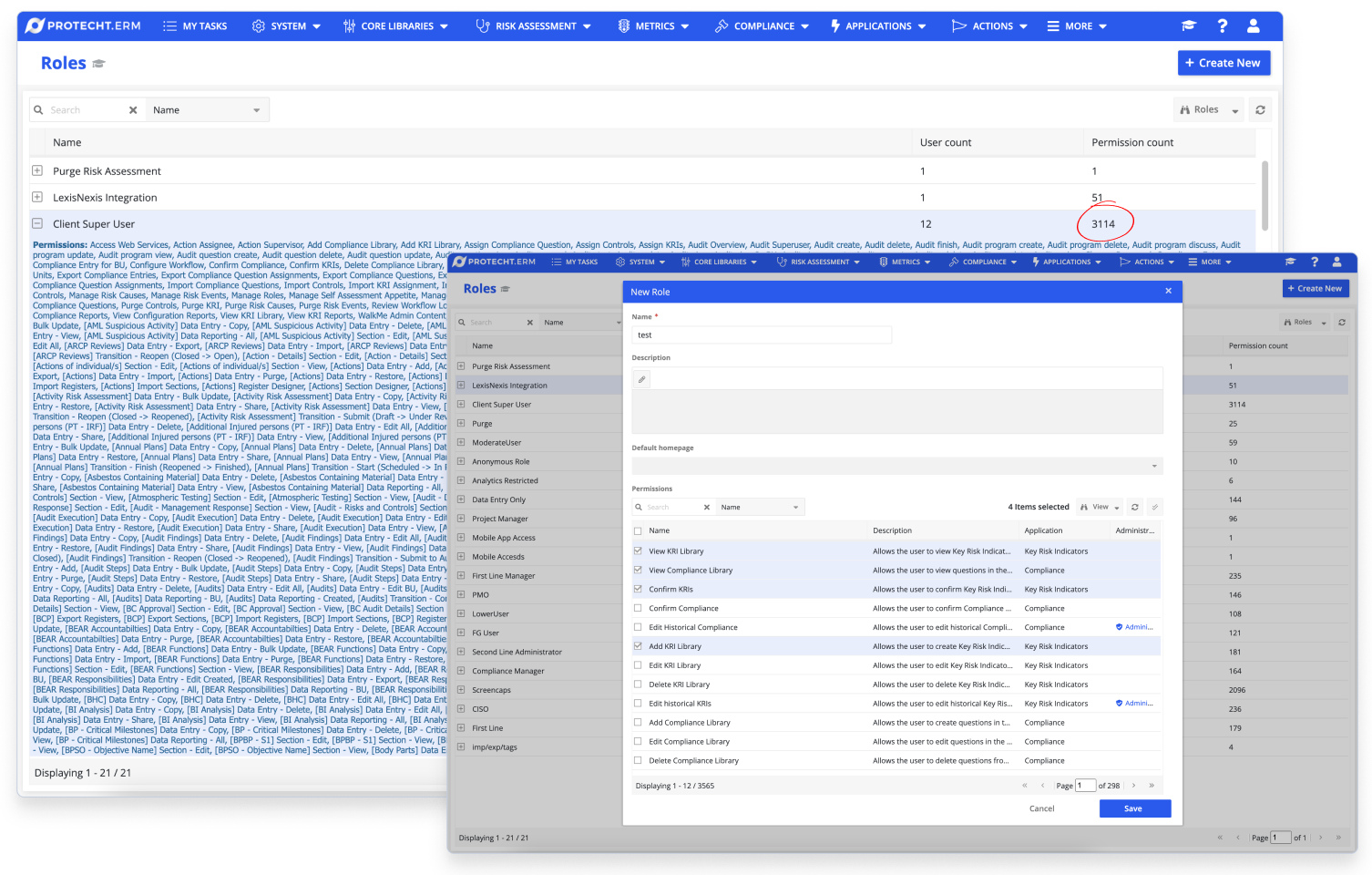
- Some roles had over 3000 individual permissions
- Customers frequently complained about the complexity
- Poor user experience was hindering effective use of the ERM system
The challenges were significantly impacting Protecht's business:
- Implementation specialists received constant complaints and requests for assistance in configuring roles and permissions
- Onboarding new customers took up to 9 months due to setup complexity
- New business model charging by role type couldn't launch with a broken system
This problem had sat in the backlog for years. Nobody wanted to start it because we couldn't just rebuild from scratch. The product was 20 years old. Hundreds of enterprise customers were already running on the old system. Their configurations had to keep working while we built the new one.
We needed to completely reimagine the Roles and Permissions interface while maintaining the necessary level of control for enterprise customers. The CEO personally championed this project and wanted it fixed yesterday.
Talking to Users
The system was built by developers and their needs. I started by talking to the people who actually use the system to understand their workflows and pain points.
Comprehensive user research to understand how our enterprise customers preferred to assign permissions to roles:
- Conducted in-depth interviews with 10 key customers
- Analyzed support tickets and feature requests related to roles and permissions
- Held workshops with internal stakeholders to understand business requirements
Users struggled with three main pain points
- Complex permission assignment - Manually adding permissions one by one when creating new roles was time consuming and inefficient
- Difficult permission management - Managing permissions for existing roles made it tough to control access effectively
- Lack of visibility - Users couldn't identify which roles had access to specific records, resulting in lack of clarity and transparency
What users needed
- Detailed control, especially for sensitive data
- A simple way to view active permissions for each role
- An easy method to manage permissions
These insights shaped our UX redesign approach, prioritizing user-friendly features for smoother access control management.
Organizing Permissions by Module
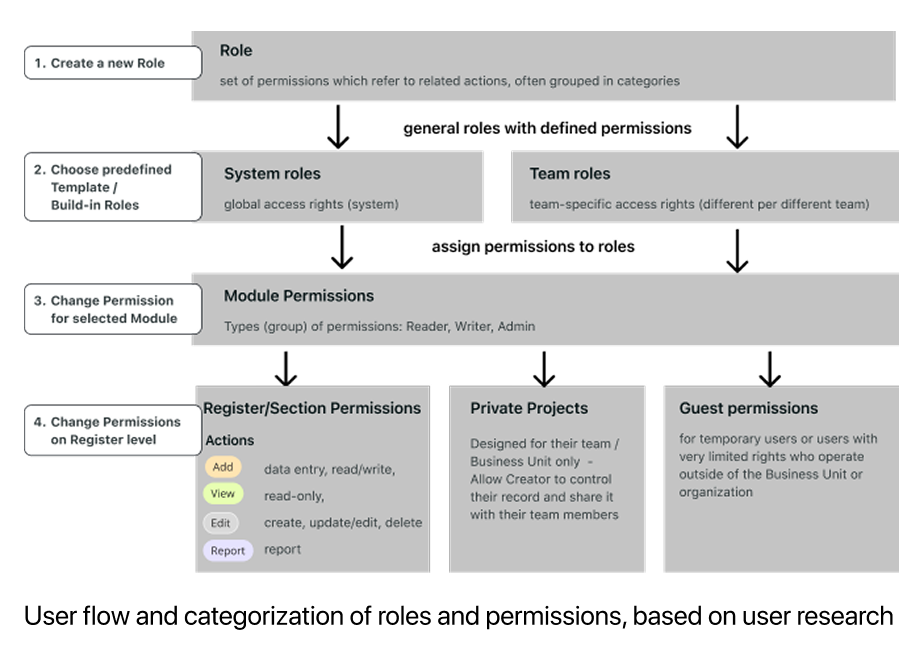
I organized the interface to show permissions by module rather than technical permission types. The idea was to allow users to apply permissions at a high level first, then drill deeper to register level if needed.
The app was highly customizable. Organizations could create and name their own modules based on their needs. I introduced the concept of "Resources" to represent these modules.
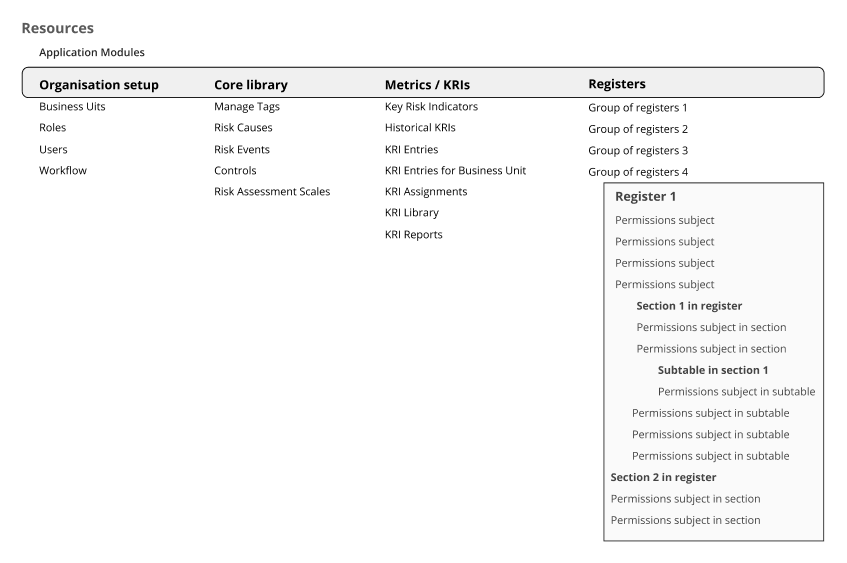
The hierarchical structure enabled progressive disclosure. High-level modules (Organisation setup, Core library, Metrics, Registers) could be expanded to show individual registers, then sections, then specific permissions within each section. Users could grant permissions at the module level for speed, or expand deeper for granular control.
I worked closely with the Enterprise Architect and CTO to ensure this structure aligned with technical capabilities.
Testing the First Design Concept
I created pre-defined "Sets of permissions" (View, Add, Edit, Admin, Report) that grouped related permissions together. Instead of selecting dozens of individual permissions, admins could apply an entire set to a module.
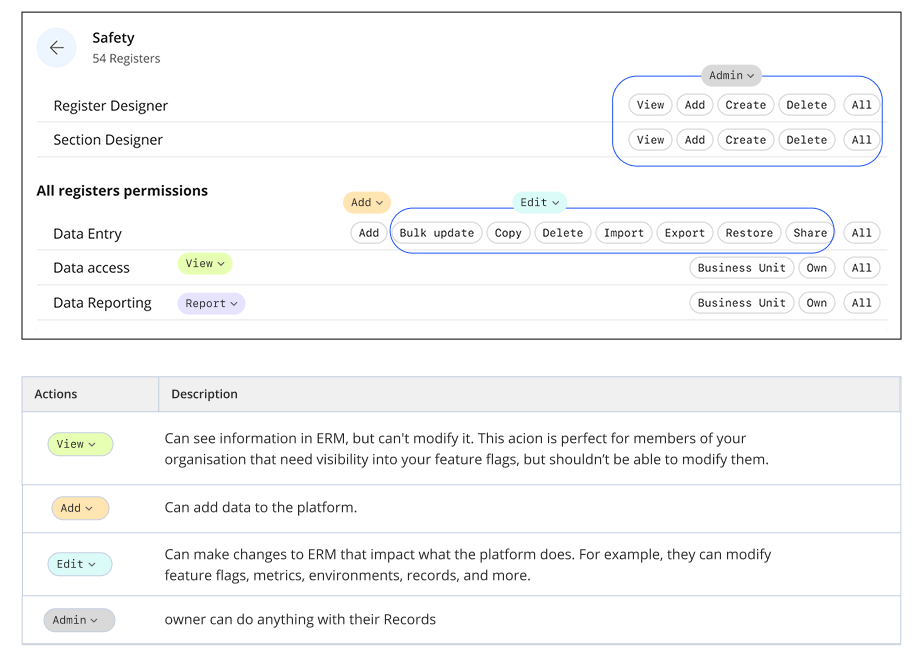
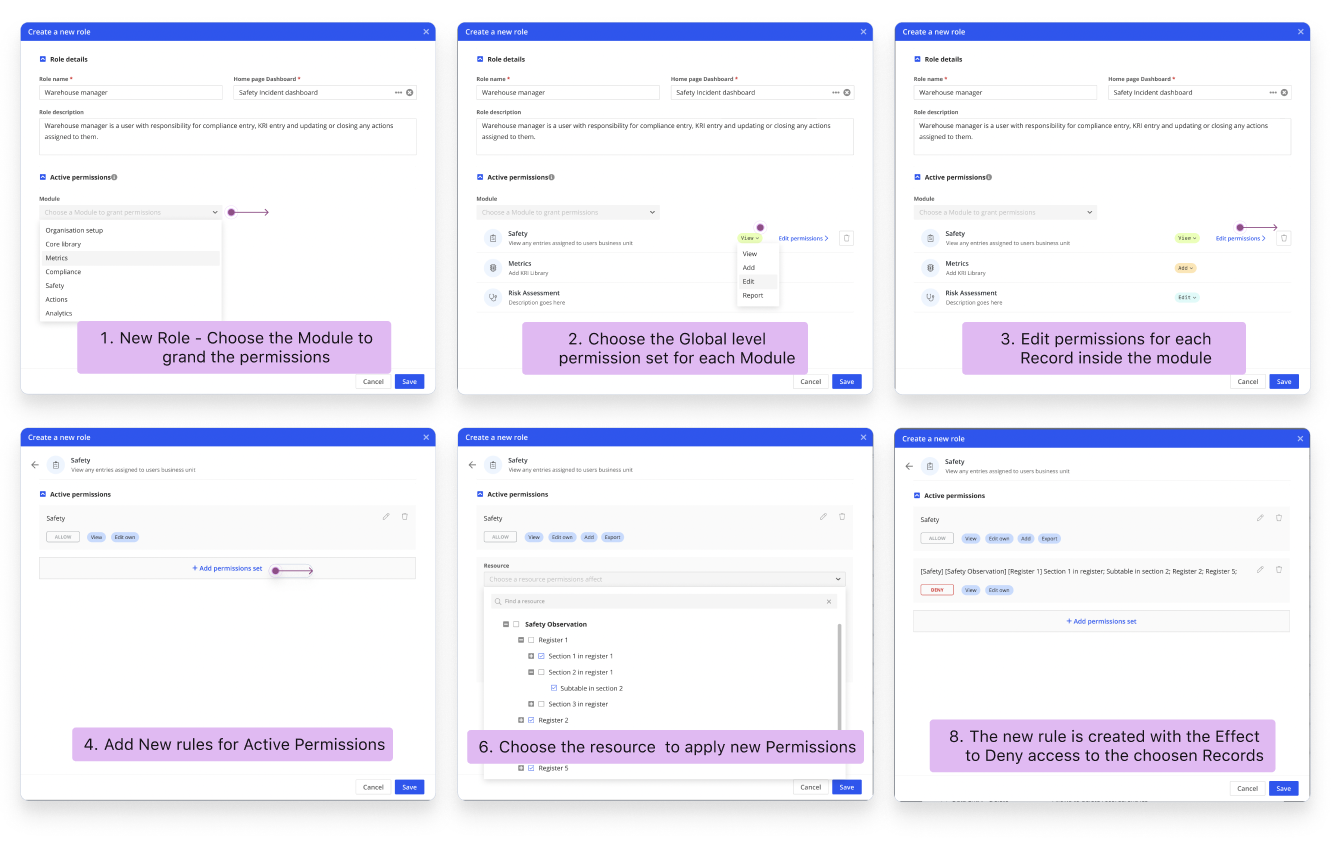
I tested this approach with clickable prototypes with 8 enterprise customers over 2 weeks. During testing sessions, users struggled to understand what permissions each set included and expressed concerns about compliance visibility.
What Testing Revealed
Users strongly rejected the permission sets approach.
They wanted to see all granular permissions upfront, not guess what "View" or "Edit" meant. These were government-regulated organizations handling sensitive data. They needed to see exactly which individual permissions they were enabling for compliance and security.
The grouped approach felt like a black box.
The Refined Design
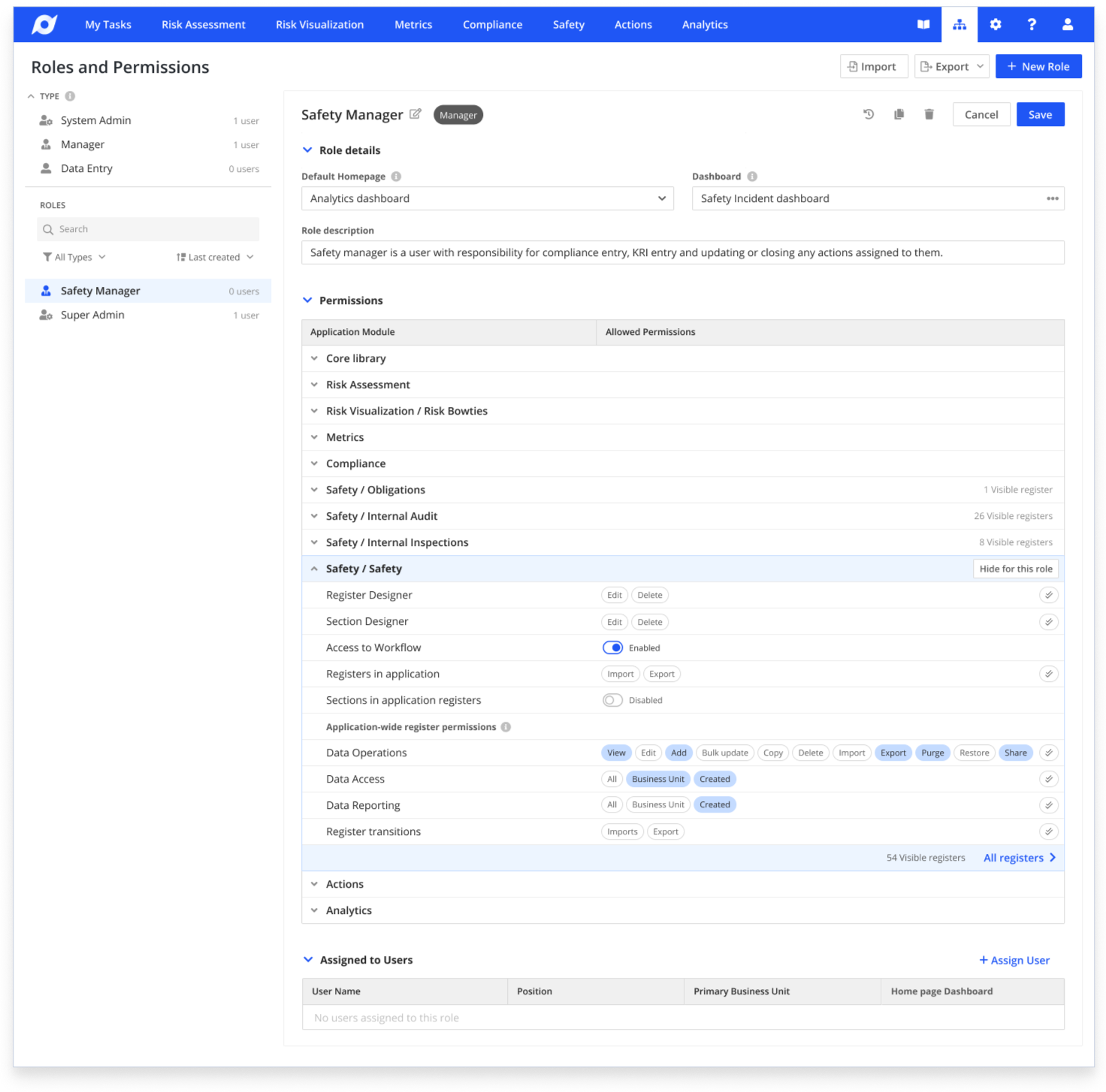
Based on feedback, I redesigned the approach to prioritize visibility and control.
We refined our design based on user feedback:
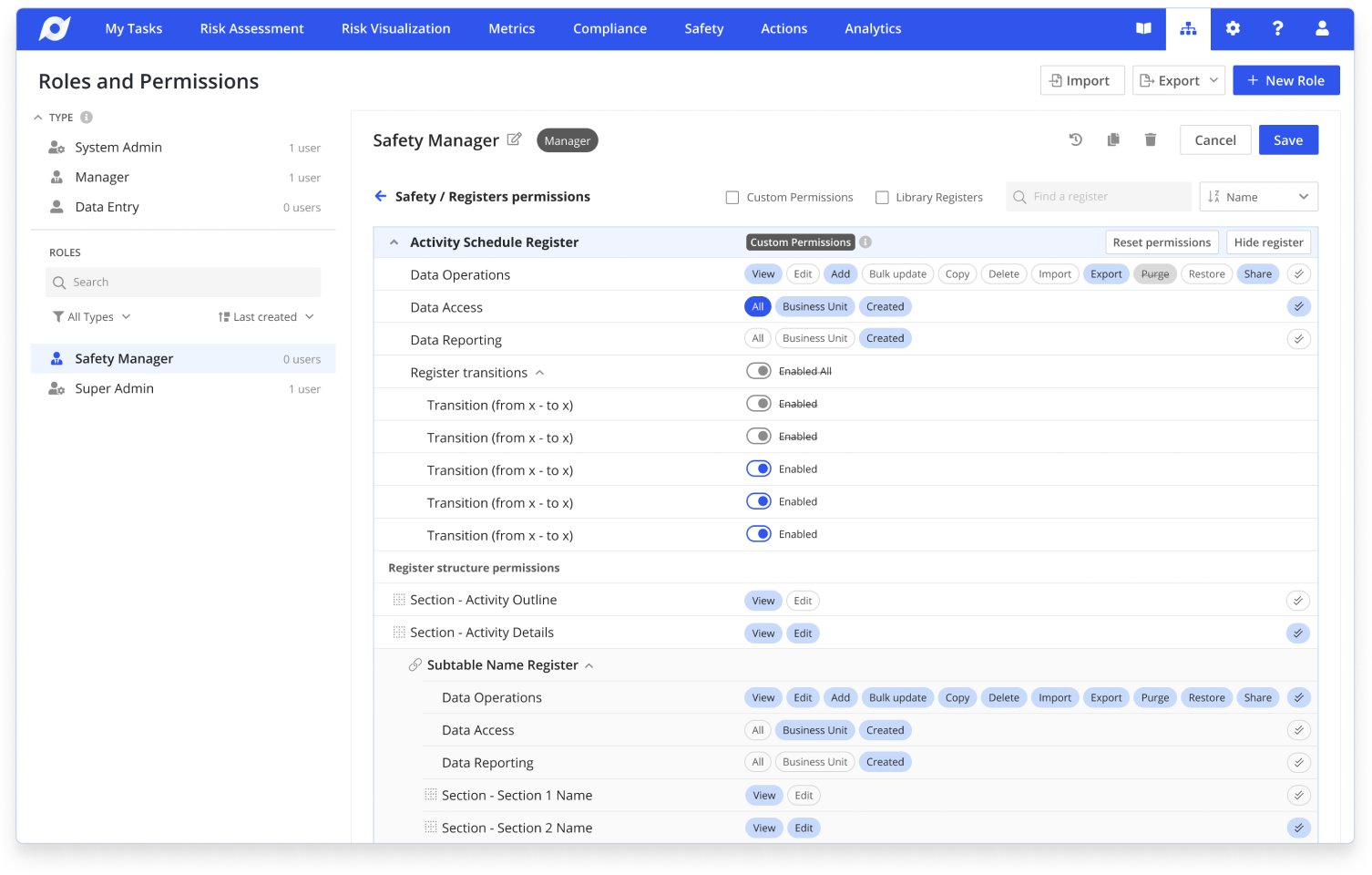
- Displayed all permissions for each Resource module upfront
- Grouped permissions to create a clear visual hierarchy
- Implemented built-in role templates for common use cases
- Added a visual, flexible way to adjust permission settings
Key Features
- Clear visual hierarchy of permissions
- Easy-to-use templates for quick role setup
- Flexible customization options for advanced users
I worked closely with the development team to ensure the design was technically feasible and could be implemented efficiently.
Migration Strategy
One of the biggest technical challenges was migrating hundreds of existing customer configurations without breaking their systems.
The smart move was to keep all existing permissions exactly as they were in the database. We didn't change the complex technical setup or force customers to reconfigure anything. Instead, we built an interface that showed permissions progressively based on what users needed to see.
I worked with the Enterprise Architect to create smart grouping in the interface layer. The hierarchical module structure and progressive disclosure meant users could quickly see what was enabled without being overwhelmed by 3000+ options. They could expand sections on demand to access granular controls when needed.
We tested the migration with three pilot customers. All three confirmed they could see and manage their permissions more clearly than before, without any changes to their actual setup.
This approach enabled 100% successful migration without a single broken configuration. By solving the problem through interface design rather than forcing structural changes, we delivered better UX while reducing technical risk.
Making the Complex Manageable
I collaborated closely with our UX Writer to create clear, concise help documentation and guidance throughout the interface.
Together we worked on
- Step-by-step guides for common tasks with inline help text for form fields
- A glossary of terms with tooltip explanations for complex features
- Quick-start guides for new users integrated directly into the UI
This comprehensive approach to user guidance aimed to reduce the learning curve and improve user confidence in managing roles and permissions.
To maintain design quality and enhance user understanding throughout the project
- Developed a comprehensive design system for consistency
- Conducted weekly design review sessions with the team
- Implemented a design QA checklist for each feature
- Ensured compliance with WCAG 2.1 accessibility guidelines
Measurement and Results
Performance
Reduction in customer onboarding time (9 months → 2 months)
Fewer support tickets about roles and permissions
Migration
Successful migration of existing customer configurations
Permission configurations migrated without breaking setups
Project outcomes
- Successfully migrated all previous role setups to the new system
- Established a streamlined and intuitive role-based permission system
- Simplified permission assignment and management processes
- Increased clarity and transparency in the access control structure
- Customer satisfaction for permission configuration improved significantly
- New pricing model based on role complexity launched successfully
Reflection
This project taught me that complex enterprise systems don't need complicated interfaces. The breakthrough was organizing around how users think about their work, not how the database was structured.
The hardest challenge was convincing stakeholders to invest in proper research and structure when they wanted immediate solutions. The CEO kept asking why we needed two weeks for research instead of jumping straight to design. I had to show support ticket data and user quotes to demonstrate that building from feature requests would recreate the same problems. But the foundation we built paid back tenfold in reduced support load and faster onboarding.
What I'm most proud of is how we transformed the work for implementation specialists. They used to dread permission configuration. Now they use it as a selling point in demos. I sat in on a recent sales call where the specialist spent 10 minutes showing off the permission interface as a competitive advantage.
"Anna brought exceptional UX expertise and strategic thinking to our enterprise platform redesign. She took the time to deeply understand our complex user needs and translated them into elegant, intuitive solutions. Her ability to balance user requirements with technical constraints was invaluable. Anna's collaborative approach and clear communication made her a pleasure to work with, and the results speak for themselves - we saw dramatic improvements in customer satisfaction and onboarding efficiency."

Rhys Johnston
Chief Technology Officer
Protecht